


What is stackable


If you work as an IT man/woman, you definitely know different kinds of network equipment such as server, switch, module, CPU and etc. maybe you want to create a small network for your business or your job, in this case you must know the uses of network equipment and their abilities.
In this article, we want to talk about Stackable ability that it uses in network switch. One of the most famous and valuable company in produces network switch is cisco. This ability is bold in some of cisco switches. But what is stackable?
What is stackable:
some of network switches have this ability for connecting other switches together as a single one. Stacking is very useful for increasing the capacity of network fast. The goal of stacking is can bring more benefit for a network. A stack is a solution for network that made by composed two or more stackable switches. Stacking solution shows us functionality of a single switch, while its number of ports increased.
Stackable switches are customarily Ethernet, rack-mounted, managed switches of 1–2 rack unit (RU) in size, with a fixed set of data ports on the front. Some models have slots for optional slide-in modules to add ports or features to the base stackable unit. The most common configurations are 24-port and 48-port models.
What is stackable switch:
Stackable switch is a device that formed by connecting multiple switches as a single unit that make of three main factors; member switches, stack port and stack cable. Members of switches are individual units that make up the stack, including stack master, stack backup and stack member switches. Stacking ports are interfaces used to connect member switches, usually special interface Network modules or ports. Stack cables are dedicated cables used for physically connecting member switches, which transmit data and control information to enable member switches to work cooperatively.
How does stacking work:
Primarily, network stacking hinges on pre-configuration done by the manufacturer. Stackable switches are designed to go into stacking mode fairly easily. Some operate on a completely pre-configured design while others allow for more manual control. In either case, the switches will use designated ports (by the network admin or the manufacturer) to communicate with each other.
Ultimately, the stack is managed through a master switch. This is the switch that you configure and control directly. It’s then disseminated configuration and instructions to the rest of the switches in the stack. You can control every unit in the stack by connecting to the master.
Robust stacks will use a backup. This is pre-designated to fill the master role if the master switch goes offline. Having a backup allows the network to endure master switch failure without meaningful downtime. When the backup takes over, it becomes the master and a new backup can be designated. Ideally, the network never has to go down for you to change the master switch.
There are two main roles: stack master and stack slaves. Stack master is the core switch to manage other stack members and it stores the running configuration files for the whole switch stacking. Generally, except for the stack master, the other switches in a stack are called stack slaves.
Users can log in to the stack system through the master switch, and perform unified configuration and management on all member switches of the switch stacking system. If the stack master fails, the stack system will be switched for a period of time and a new master switch will be selected among the slave switches.
The number of switches in a stack varies from model to vendor. However, no matter how many switches are grouped into a stack, there is always a stack master that is assigned to control the operation of the switch stacking.
It is important to note that some switches come with built-in stacking capabilities, while others need a separate stacking module. Also, some switches require specific stacking cables. It is important to know which switch you are purchasing or that you require for your specific project to make sure you are getting exactly what you need for your setup.
Why stacking?
In a rapidly evolving networking landscape, businesses require efficient and streamlined management solutions to stay ahead of the competition. This ability is essential for expanding capacity of switch without challenges of managing multiple devices. Switches that have stackable ability can add or remove by stack without affecting on the performance of stack. Switch stacking is an important technology that connects multiple switches together.
Switch stacking has emerged as a powerful technique that not only simplifies network administration but also enhances overall efficiency. Depending on stack’s technology, it can continue to transfer data even if a link or unit within stack fails. And if a link fails in the stack, other stackable switches will continue to work. This topic makes stacking a flexible, effective and scalable solution for extending network capacity and network applications.
Stackable switches can improve network scalability, reliability and flexibility, increase bandwidth, and simplify networking. Stacking saves users from managing multiple devices simultaneously, especially in medium data centers or IT rooms. Users can add or remove switches in the stack unit as required without affecting the whole network performance.
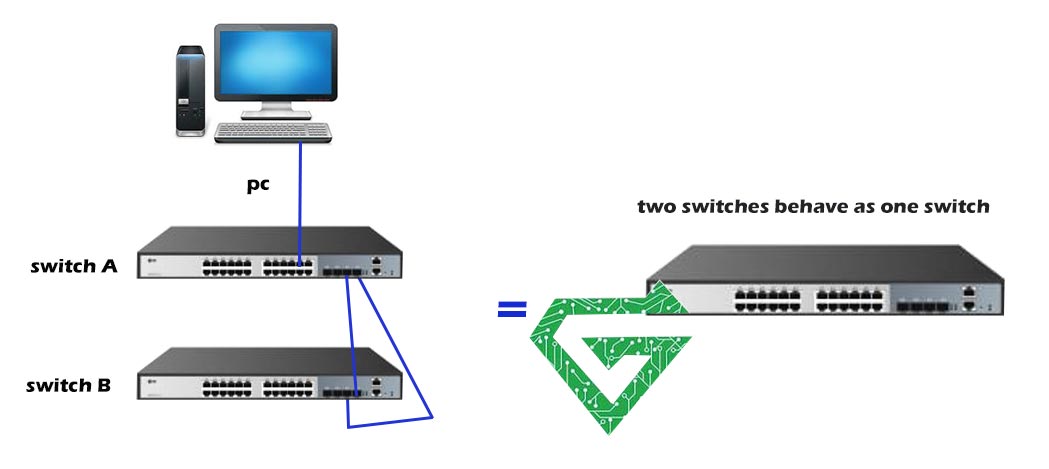
stacking technologies:
There are two types of stacking technologies:
- Backplane stacking: it means the stack cables and ports are located on the back of stackable switch.
- Frontplane stacking: it means the stack cables and ports are located on the front of stackable switch.
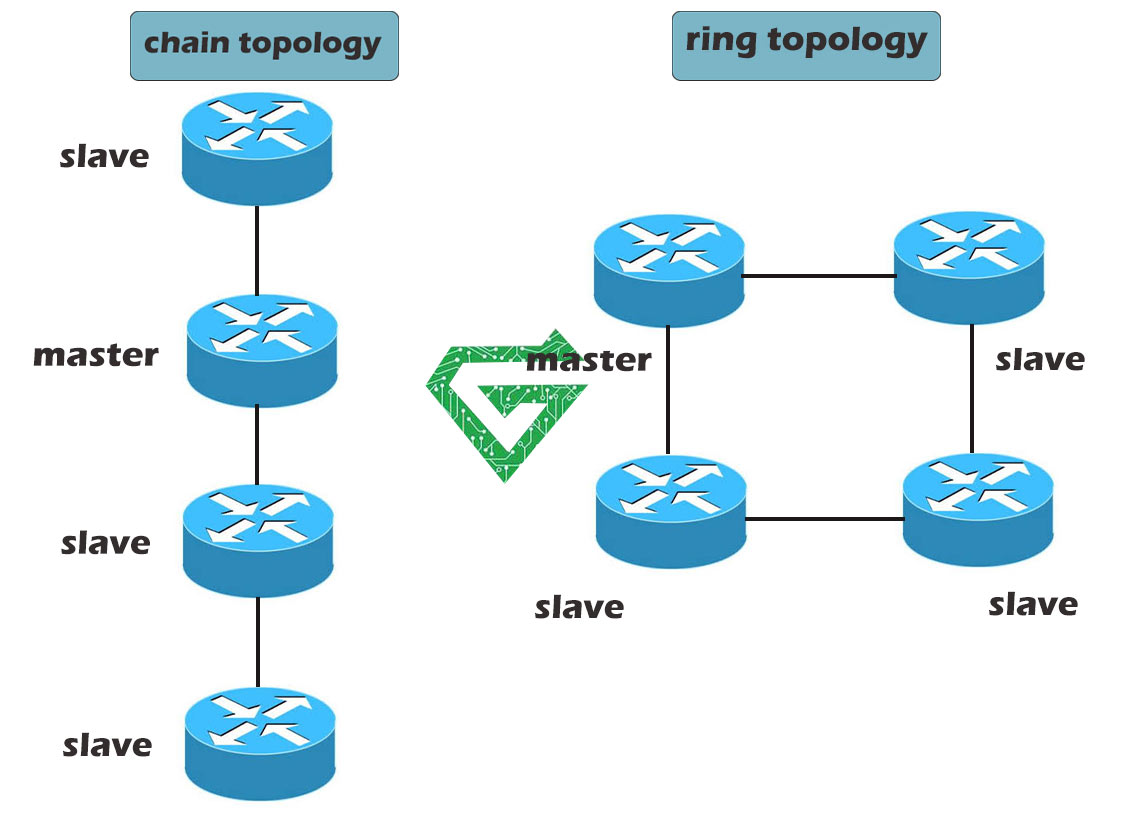
You know, this ability in switches can create different stacking topologies such as daisy chain, that full of mesh and ring topology provides redundancy and resiliency, as when a switch fails, data can be transmitted through the alternative path.
Stackable topology:
There are two typical switch stacking topologies, their names are chain topology and ring topology. Both of them have their own advantages and disadvantages.
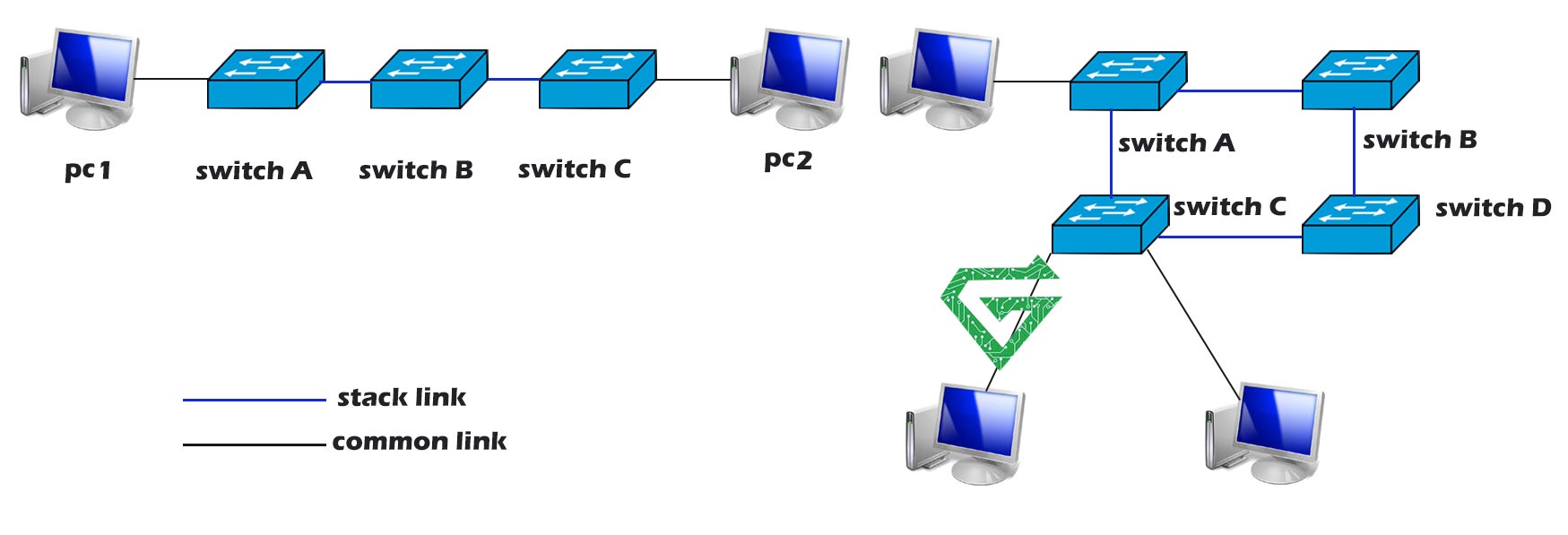
- Chain topology: The first and last stack switches do not need to be physically connected, which is suitable for relatively long-distance stacking. However, if a stack link fails, the whole stack will split.
- Ring topology: The first and the last stack switches in ring topology need to be physically connected. Therefore, ring topology is not suitable for long-distance transmission when stacking with DAC cables or other short-range stack cables. When one of the stack links fails, the ring topology becomes chain topology, which does not affect the normal operation of the switch stacking system. Therefore, ring topology offers higher reliability than chain topology.
Why do we use switch stacking:
Stacking can resolve some issues of low link utilization and high maintenance costs caused by redundancy in traditional campus network. Like these issues that explain in continue;
- Simplify Management:
By stacking switches, multiple switches can be managed and configured in a unified manner, improving management efficiency. The network administrator only needs to operate on the stack master switch to manage and configure the entire stacking system without configuring each member switch separately. In addition, a unified management interface also facilitates monitoring and troubleshooting.
- Improve Reliability and Stability
Switch stacking enables redundancy backup to improve network reliability and stability. When the stack master fails, the backup switch can take over as the new master. This redundant design can greatly reduce the risk of network interruption and improve the overall system reliability. In addition, switch stacking can realize cross-device link aggregation by bundling multiple physical links into a logical link, which has provided higher bandwidth and redundancy, further enhancing network stability.
- Increase Bandwidth
Through switch stacking, port aggregation across switches can be realized to bundle multiple physical ports into a logical port, increasing the network bandwidth capacity. When traffic load increases, load balancing can be achieved to distribute traffic to multiple physical links, improving bandwidth utilization. Therefore, switch stacking is very suitable for application scenarios requiring high-bandwidth transmission, such as data centers and video media streaming.
if you want to know about cisco switches, click on What is Cisco Switch
What are benefits of stackable switches:
- Simplified network administration: Whether a stackable switch operates alone or “stacked” with other units, there is always just a single management interface for the network administrator to deal with. This simplifies the setup and operation of the network.
- Scalability: A small network can be formed around a single stackable unit, and then the network can grow with additional units over time if and when needed, with little added management complexity.
- Deployment flexibility: Stackable switches can operate together with other stackable switches or can operate independently. Units one day can be combined as a stack in a single site, and later can be run in different locations as independent switches.
- Resilient connections: In some vendor architectures, active connections can be spread across multiple units so that should one unit in a stack be removed or fail, data will continue to flow through other units that remain functional.
- Improving backplane: A series of switches, when stacked together, improves the backplane of the switches in stack also.
Functionality of stackable switches:
- Single IP address for multiple units: Multiple switches can share one IP address for administrative purposes, thus conserving IP addresses.
- Single management view from multiple interfaces: Stack-level views and commands can be provided from a single command line interface (CLI) and/or embedded Web interface. The SNMP view into the stack can be unified.
- Stacking resiliency: Multiple switches can have ways to bypass a “down” switch in a stack, thus allowing the remaining units to function as a stack even with a failed or removed unit.
- Layer 3 redundancy: Some stackable architectures allow for continued Layer 3 routing if there is a “down” switch in a stack. If routing is centralized in one unit in the stack, and that unit fails, then there must be a recovery mechanism to move routing to a backup unit in the stack.
- Mix and match of technology: Some stackable architectures allow for mixing switches of different technologies or from different product families, yet still achieve unified management. For example, some stacking allows for mixing of 10/100 and gigabit switches in a stack.
- Dedicated stacking bandwidth: Some switches come with built-in ports dedicated for stacking, which can preserve other ports for data network connections and can avoid the possible expense of an additional module to add stacking. Proprietary data handling or cables can be used to achieve higher bandwidths than standard gigabit or 10-gigabit connections.
- Link aggregation of ports on different units in the stack: Some stacking technologies allow for link aggregation from ports on different stacked switches either to other switches not in the stack (for example a core network) or to allow servers and other devices to have multiple connections to the stack for improved redundancy and throughput. Not all stackable switches support link aggregation across the stack.
Read more: StackWise Technology
Is it necessary to use stackable switch:
Although stackable switch has a lot of benefits, it may not always be an optimal solution for every network environment, also there are some disadvantages of stackable switches:
- Restricted Selection:
Multiple switches used in switch stacking must be from the same vendor and series. If a vendor’s product does not meet the requirements of a specific network environment, switches of other brands or models cannot be used in stacking. This limits the flexibility and scalability of network architecture and may lead to the inability to achieve the optimal solution in some cases.
- Resilience:
A stacking switch runs in a single management or control plane mode. On the one hand, it can simplify management. On the other hand, it may reduce the overall resilience of the network. When the stack master encounters some specific failures, switch troubleshooting takes time, and other member switches in the stack may not work properly, resulting in slower network recovery speed.
- Manageability:
Expanding an existing switch stacking may cause lengthy service disruptions. A series of steps such as firmware upgrade, reconfiguration and testing are required for stack expansion, which may require suspending network services. In addition, removing a switch from the stack may involve a complicated process. Atech.ae has some network switches that support stacking, that you can buy them from its site and having its guarantee and supporting for a year.