


What is Network Card Module


A large developer of industry computing solution is NIC. This technology helps to network and network equipment a lot. Network Interface Module offers a multitude of solution for virtual network deployment and management.
NIC supports a wide range of virtual machine devices. This technology provides a large range of scalability and reduce bottleneck impediments to the bare minimum. We want to explain What does a Network Card Module do?
What is Network Card Module:
Network Card Module or Network Interface Card is used to connect a computer to a network. You can use NIC for handling all details of packet transmission and reception without using CPU to control and handle every bit. Most of them are designed for a special type of network media and expansion board that you can insert in your computer.
In other words, as we said, the network interface card function communication between a computer or server, local area network (LAN), wide area network (WAN) and the internet. NIC allows computer and server connect to a network’s physical medium such as copper wire, fiber optic or wireless transmission.
NIC can solve most problems of layer 2 that point of them. As frames travel over the wire, bad cabling, transceivers and other physical layer issues can cause corruption. Most of errors occur at layer 2, the following are some of the more common ones:
- Runts: In Ethernet networks, the minimum frame length is 64 bytes. If a frame is shorter than 64 bytes, it is called a runt. Runts are sometimes caused by collisions, and that is normal behavior. However, they can also be caused by bad hardware, transmission problems, or a poor network design.
- Giants: The maximum frame length in Ethernet is 1518 bytes. If a frame is larger than 1518 bytes, it is considered a giant. Giants are generally caused by bad transmitters on a NIC. They can also be caused by transmission problems, either by addition of garbage signals or by corruption of the bits that indicate the frame size.
- CRC: CRC errors occur when the FCS value on the Ethernet frame does not match the calculated FCS value. These errors are caused when frames are damaged in transit.
- Alignment errors: All frames should end on an 8-bit boundary. If a problem on the network causes the frame to deviate from this boundary, an alignment error occurs. Misaligned frames are caused by either the transmitting NIC or bad cabling. Alignment errors can also be caused by a poorly designed network that does not meet the Ethernet specifications.
Functions of Network Card Module:
Network Module has some functions like data conversation, data transfer, addressing, traffic control, error detection and correction and buffering that explain them in continue;
- Data Conversation: The NIC converts digital data from the computing device into signals appropriate for transmission over the network medium. Conversely, it also translates incoming signals back into digital data that the device can process. This conversion aligns with the specific requirements of the networking standard in use, for example Ethernet or Wi-Fi.
- Data Transfer: The NIC is responsible for the actual transmission and reception of data packets. It sends data packets out onto the network and receives incoming packets from other network sources. This involves encapsulating data within the proper frame structure for network communication.
- Addressing: Each NIC has a unique Media Access Control (MAC) address assigned to it, which is necessary for network communications. This hardware address allows the NIC to be precisely identified on a local area network and enables the accurate delivery of packets to and from the device.
- Traffic Control: To maintain optimal network performance, the NIC manages data flow by using algorithms and protocols that prevent data collisions and minimize congestion on the network. This might include implementing carrier sense and collision detection techniques in Wi-Fi or Ethernet networks.
- Error Detection and Correction: As part of its responsibility to ensure the integrity of data, the NIC checks each packet for errors using checksums or other error-detection codes. If an error is detected, the NIC may request that the data be resent or attempt to correct the error through forward error correction, depending on the protocols in place.
- Buffering: Due to the potential differences in speed between the network’s data transfer rate and the device’s processing speed, the NIC temporarily stores incoming or outgoing data packets in a buffer. This helps to align the data flow rate with the processing capabilities of the device, preventing loss of data and improving overall transmission efficiency.
What are Network Card Module components:
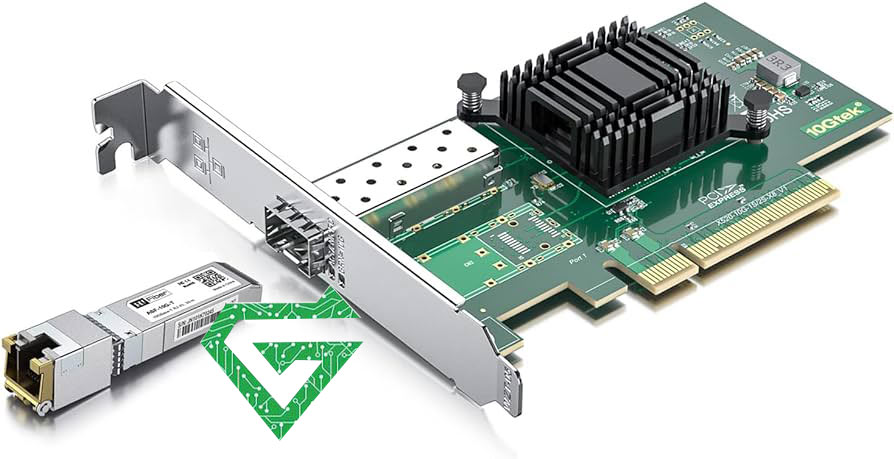
A network card module has 6 parts include controller, Boot Rom Slot, Interface Port, Bus Interface, LED Indicators, Bracket.
- Controller: The central component of the NIC, responsible for processing data transmission.
- Boot ROM Slot: Allows diskless workstations to boot via the network, enhancing security and reducing costs.
- Interface Port: Connects to the network using an Ethernet cable or transceiver to transfer data signals.
- Bus Interface: Plugs into an expansion slot to link the NIC with the computer’s motherboard.
- LED Indicators: Show the network card’s connection and activity status, providing users with an understanding of its operation.
- Bracket: Comes in standard and compact sizes for securing the NIC within the expansion slot.

Read more: What is Cisco network module
What does a Network Card Module do:
This device connects ethernet cable to a network switch and connect your computer, server to other devices with network. This network card module can be into a router for connecting with the internet. These network cards support different types of speeds from 1G to 40G. if you want to have a quick switch, you will need a NIC. A network card module gives your device ability for communicating to a router or network switch with cable switch.
What are types of Network Card Module:
This device can divide into different types based on variety features such as host interface, speed and fields, follow types of Network Card Module in continue;
-Based on the Host Interface
- PCI (Peripheral Component Interconnect)
PCI use a traditional connection interface that was widely used in desktop of computers. It is a parallel interface hat supports relatively slow network data transfer speeds.
- PCI-X (PCI Extended)
PCI-X is an enhanced version of the PCI network card, boasting higher data transfer rates, initially designed to meet the demanding data throughput needs of the server market.
- PCIe (PCI Express)
PCIe NICs utilize the latest bus standard in the PC architecture, known as PCI Express, which uses serial communication to offer higher data transfer rates and lower latency compared to PCI and PCI-X. PCIe NICs come in various specifications, including different numbers of data lanes (such as x1, x4, x8, x16), suitable for both desktop computers and servers.
An external device that connects via a USB interface, is user-friendly and ideal for portable computers and PCs without built-in network cards.
- ExpressCard
An interface card designed specifically for laptops, it offers faster speeds than USB.
- M2
A compact interface commonly used in laptop computers and small form factor devices.
- Mini PCI and Mini PCI Express
Mainly used in laptops, these cards are smaller than standard PCI/PCIe cards and are suited for environments with high space constraints.
-Based on Transfer Speed
- 10 Mbps Network Cards: Compliant with the early 10BASE-T Ethernet standard.
- 100 Mbps Network Cards: Also known as Fast Ethernet cards, they are a faster networking option.
- 1 Gbps Network Cards: Provide Gigabit Ethernet speeds, suitable for applications requiring higher network bandwidth.
- 10 Gbps Network Cards: High-speed network interface commonly used in data centers and environments that require very high network performance.
- Higher Speed Network Cards (40Gbps, 100Gbps, 200Gbps, 400Gbps): These are used for very high-end data transfer tasks, such as in large data centers or for high-performance computing tasks.
NIC cards provide from 10G to 400G, ensuring that enterprises and networking professionals have access to the latest technologies to keep up with the ever-growing data and bandwidth demands of modern network environments.
-Based on Application Fields
- Computer NIC: Today, most new computers have the NIC cards built into the motherboard, so a separate LAN card is not needed. It commonly comes with 10/100Mbps, and 1Gbps speed, and allows one PC to communicate with other PCs or networks.
- Server NIC: The main function of a Server NIC is to manage and handle network traffic. Compared with the ordinary PC network adapter, server adapters usually require faster data transmission speeds like 10G, 25G, 40G, and even 100G. Plus, server adapters have a low CPU occupancy rate, since it has a special network controller that can take many tasks from the CPU.
-Based on Transmission Medium
- Wired Network Cards:
Ethernet Cards: Use twisted-pair cables for data transmission.
Fiber Optic Cards: Transmit data via fiber optics, supporting longer distances and higher speeds.
- Wireless Network Cards:
Wifi Cards: Follow the IEEE 802.11 wireless communication standards to provide wireless network connectivity.
Bluetooth Adapters: Enable devices to communicate via Bluetooth.
Cellular Network Cards: Connect to mobile networks through cellular standards like 3G, 4G LTE, 5G, etc.
When do we need a Network Card Module:
A network card module is a very important to custom servers and custom-built computers as it allows this device to communicate with other technologies within your network. The wired connection of a NIC is often quicker, more efficient and safer than wireless communication, so, you are in houses around the world.
Maybe, it’s interesting to know, what is a wireless a network card module? It connects to a wireless network, such as Bluetooth or WI-FI by using an antenna to communicate with radio waves. WNIC (Wireless Network Interface Card), therefore, communicate using layer 1 and layer 2 of OSI model. Most of PCs and laptops will have a WNIC built into the motherboard to allow wireless communication between the device and wider networks. It means that your computer will be able to connect to the internet and to other devices with Bluetooth, wirelessly.
Conclusion:
Now, you learn what is Network Card Module or basics of NIC, maybe you have some challenges about what Network Interface Card is suitable and right for your business? Atech.ae offers you variety types of NIC products. for buying this device, pay attention to critical performance optimizations, enhanced agility for communication, cloud and enterprise IT network solutions.