


What is Uplink Port and Its difference with Downlink

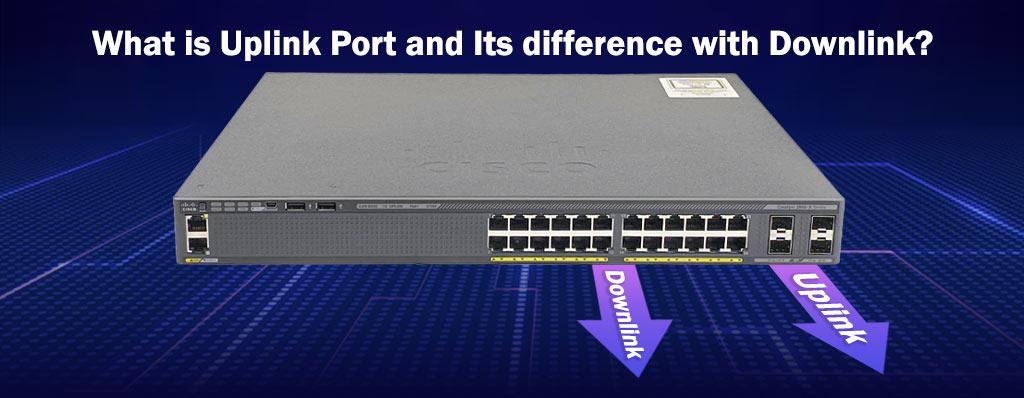
If you look at some of network equipment such as network switch, network router, server and etc, you understood there are some ports on them and sometimes there are different and not similar. The reason of this difference is different types of port.
In Atech Blog, we wrote many posts about network, one of the topic was “SFP” port that is one of type port and in this article we want to explain Uplink port.
Here’s a clear explanation of uplink ports and how they differ from normal ports on network devices.
What is Uplink Port?
An uplink port is a special type of port on a network device (like a network switch or router) that is used to connect that device to another device higher in the network hierarchy, such as:
- cisco switch
- Cisco router
- Modem
- The internet
It helps expand the network by linking devices together without causing communication issues like signal collisions.
Difference Between Uplink Port and Normal Port:
| Feature | Uplink Port | Normal Port |
|---|---|---|
| Purpose | Connects to higher-level devices (other switches, routers, modems) | Connects to end devices (PCs, printers, etc.) |
| Wiring | Usually has reversed Tx/Rx pins to directly connect to another switch/router | Standard wiring (straight-through) |
| Auto MDI-X Support | Often unnecessary if auto MDI-X is available | Also uses auto MDI-X in modern devices |
| Location | Often labeled "Uplink", sometimes isolated from the rest | One of the regular numbered ports |
| Cascading Devices | Designed specifically for cascading switches/routers | Can be used for cascading if auto MDI-X is supported |
Most modern switches and routers support auto MDI/MDI-X, which automatically adjusts for the type of cable (straight-through or crossover) and port type. This means you can use any port to uplink and uplink ports are less important now than they were in the past.
-
Old scenario: You use a crossover cable to connect a normal port on one switch to a normal port on another.
-
New scenario: Just plug a standard Ethernet cable into any port (uplink or not), and auto MDI-X handles the rest.
What is a Downlink Port?
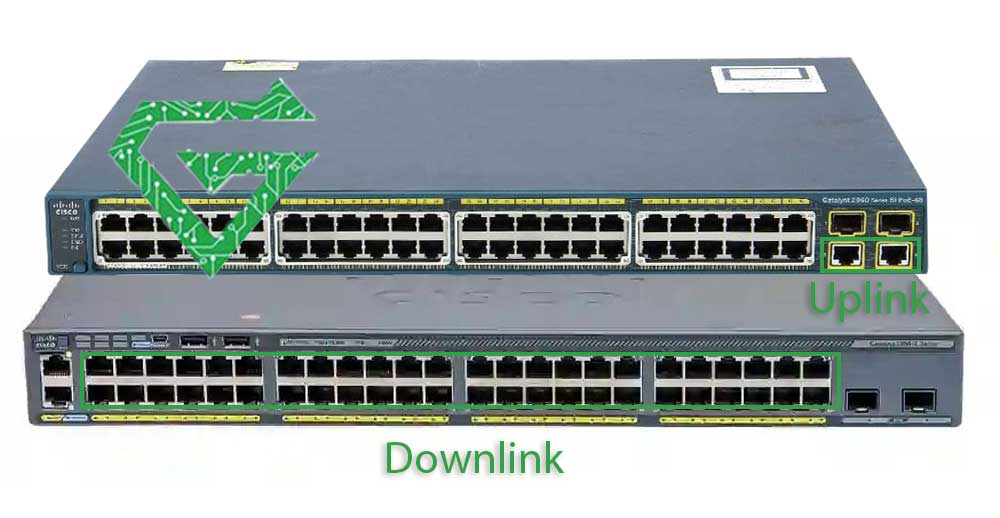
A downlink port is a port on a network device (like a switch or router) that connects to lower-level or end devices in the network hierarchy, such as:
- Computers (PCs, laptops)
- Printers
- IP cameras
- Phones
- Access points
In simple terms, downlink ports are the “normal” ports on a switch or router they send network access down to the devices that use it.
Comparing Uplink & Downlink:
| Feature | Uplink Port | Downlink Port |
|---|---|---|
| Connects to | Higher-level devices (routers, other switches) | End devices (PCs, printers, etc.) |
| Direction | Data goes up the network chain | Data goes down to end devices |
| Common Labeling | May be labeled "Uplink", "WAN", or separate | Usually numbered ports (e.g., 1–24 on a switch) |
| Special Configuration? | May have special settings or wiring | Standard Ethernet behavior |
- Uplink = the trunk or branches going up
- Downlink = the smaller branches and leaves (the end devices)
With an example, explain better. imagine you have a 24-port switch:
- Port 24 is labeled “Uplink” and connects to your router.
- Ports 1–23 are downlink ports, connecting to office computers and printers.
Read more: What is Cisco Switch
How an Uplink Port Works?
An uplink port works by enabling direct communication between two network devices (typically switches or routers) without needing a crossover cable or manual configuration, but What Makes It Special?
-
Transmit/Receive Pin Reversal:
- Ethernet ports use specific pins to send (TX) and receive (RX) data.
- A regular Ethernet port expects to connect to an end device (like a PC), which has complementary TX/RX wiring.
- An uplink port reverses its TX and RX pins, so it can connect directly to another switch/router, which also uses the same standard.
- Cable Type Compatibility:
- Traditionally, connecting two similar devices (switch ↔ switch) required a crossover cable.
- An uplink port removes this need, you can use a standard Ethernet cable (straight-through), and it still works.
- MDI vs. MDI-X:
- MDI (Medium Dependent Interface) = end device port
- MDI-X (MDI-Crossover) = network device port (like a switch)
- An uplink port is essentially an MDI port, which allows connecting directly to another MDI-X device (like another switch).
-
Auto MDI/MDI-X (Modern Devices):
- Most modern network devices automatically detect and adjust for the connection type, so any port can act like an uplink.
-
This is why dedicated uplink ports are becoming rare, the switch figures it out for you.
Pay attention to this example scenario;
Imagine you have: Switch A (with normal ports) and Switch B (with an uplink port), You want to expand your network. Instead of connecting with
Switch A Normal Port ↔ Switch B Normal Port (requires crossover cable)
You do this:
Switch A Normal Port ↔ Switch B Uplink Port (using straight-through cable)
The uplink port on Switch B handles the signal inversion so data flows properly.
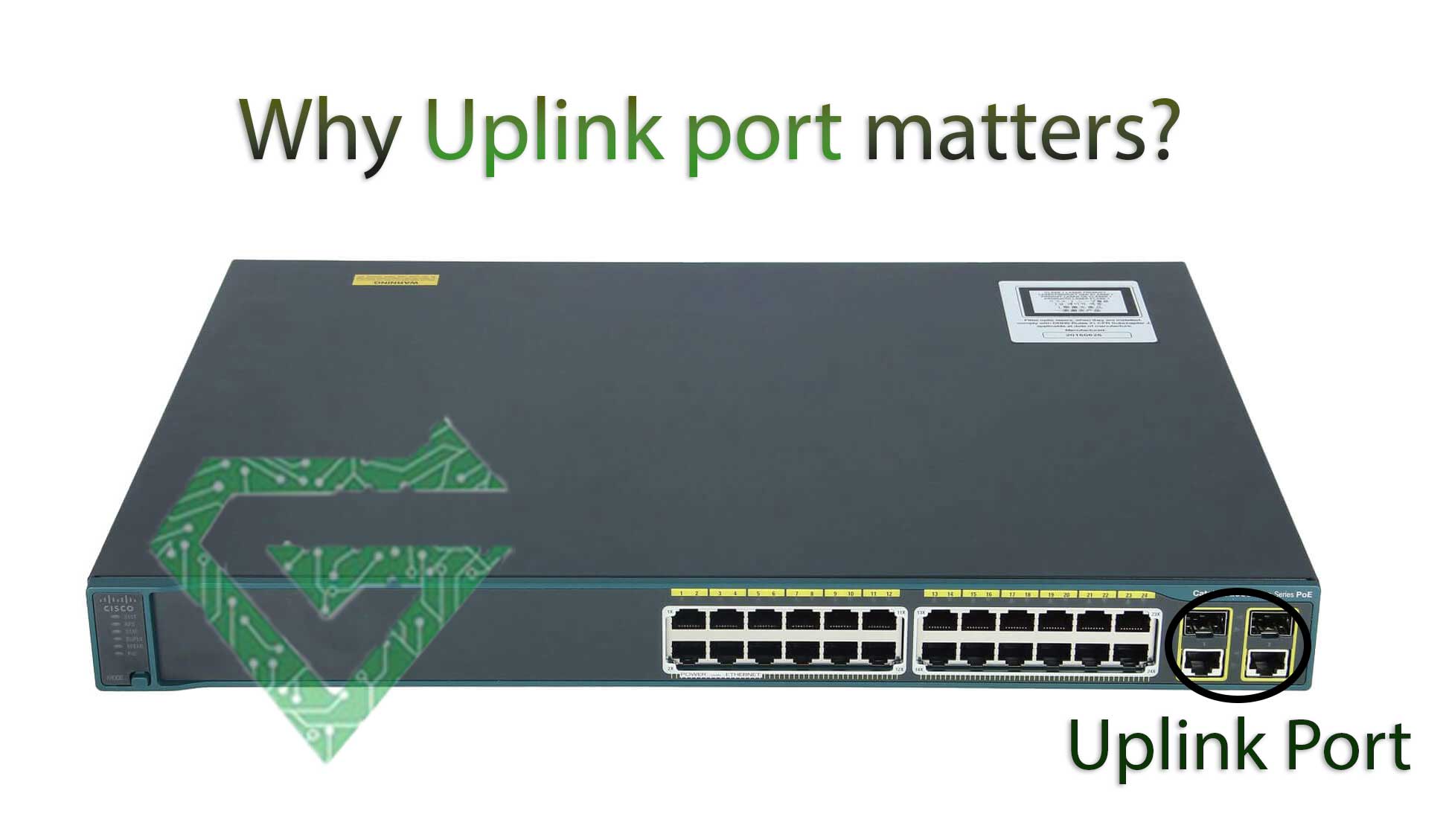
Why Uplink port Matters?
Using an uplink port correctly:
- Ensures devices at the same level (like two switches) can talk to each other
- Avoids network loops or signal collisions
- Enables network expansion cleanly
When to Use an Uplink Port?
You should use an uplink port when you’re connecting networking devices together, especially when:
- Connecting Two Switches
-
If you’re expanding your network by linking two switches, use an uplink port to connect them.
- This allows devices on both switches to communicate and share the same network.
-
- Connecting a Switch to a Router or Modem
- If you’re connecting a switch to a router (to provide internet access to all switch-connected devices), use the uplink port on the switch.
- This routes traffic from the switch to the router (which usually connects to the internet).
- Connecting to a Network Backbone
- If you’re plugging into a central network backbone or a high-capacity core switch, the uplink port is ideal.
-
No Auto MDI/MDI-X Support
- On older devices that do not support auto MDI/MDI-X, using the uplink port (and a straight-through cable) is necessary to avoid wiring mismatches.
-
Without this, you’d need a crossover cable.
When Do Not You Need an Uplink Port?
- You’re connecting end-user devices (like PCs, printers, IP phones) just use normal ports.
- You’re using modern equipment where any port can act as an uplink, thanks to auto MDI/MDI-X.
- You have a dedicated “WAN” port on routers or firewalls, use that instead of a regular uplink.
Totally, Use an uplink port when connecting “device to device”, not “device to user”.
| Connection Type | Use Uplink Port? |
|---|---|
| Switch → PC | No |
| Switch → Printer | No |
| Switch → Router | Yes |
| Switch → Switch | Yes |
| Router → Modem | Yes |
When You Can Use an Uplink Port as a Normal Port?
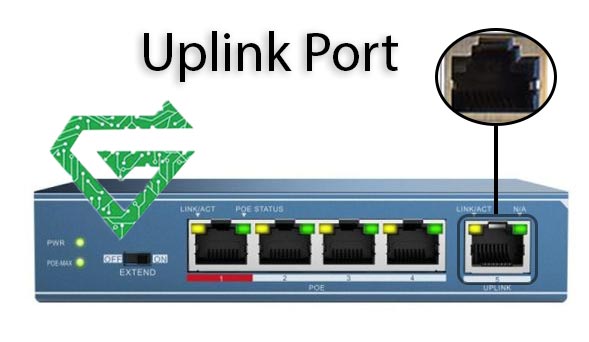
In most cases, you can use an uplink port as a normal port, especially on modern network devices.
- Modern Switches with Auto MDI/MDI-X:
- These devices automatically detect the type of device and connection (PC, switch, router).
- That means any port (including uplink) can be used like a normal port.
- You don’t need to worry about special cables (straight-through or crossover).
- Combo Ports (Dual-Purpose):
- Some switches have a port labeled “uplink” that shares its connection with a regular port (e.g., port 24 or SFP uplink).
- You can use either the uplink port or the regular port, but not both at the same time.
When You Cannot Use an Uplink Port as a Normal Port?
- Old Switches Without Auto MDI/MDI-X:
- The uplink port has fixed pin wiring designed to connect to another network device (not an end device).
- If you plug a PC or printer into the uplink port on an old switch, it might not communicate properlywithout a crossover cable.
- Dedicated Uplink-Only Ports:
- Some enterprise switches have dedicated uplink ports (e.g., fiber/SFP ports) that do not behave like regular Ethernet ports.
- These cannot be used for connecting client devices.
Summary Table:
| Situation | Uplink as Normal Port? |
|---|---|
| Modern switch with auto MDI/MDI-X | Yes |
| Old switch without auto MDI/MDI-X | Not reliably |
| SFP/fiber-only uplink port | No |
| Combo uplink port (shared port) | One active at a time |
Conclusion:
An uplink port is a dedicated network port used to connect one network device (like a switch or router) to another, enabling the expansion of a network. It simplifies connections between devices without needing a crossover cable, especially in older devices.
Uplink ports are essential for scaling networks efficiently and maintaining high-speed communication between networking hardware. If this article was useful and practical, share your idea with us. you can see our other articles in Atech blog.