


Definition of Telnet

Several protocols exist in network equipment world that help the network manager to control and make remote network. telnet is one of them that we want to explain it to you.
Telnet is a kind of protocols that improves communication over networks, we will explain about its work, its advantages, its disadvantages and its uses more during this article, so follow us to end.
Definition of Telnet:
Telnet is a network protocol that stands for Terminal Network and is used to communicate with devices remotely through the CMD (Command Prompt) command line. As you can see, Telnet is mostly used for initial setup and remote management of network equipment, systems, and network servers.
Telnet protocol enables for computer to connect to local computer and used for TCP/IP protocol as a virtual terminal. Another thing about Telnet protocol, you can connect to cisco switches and transfer the management command remotely. By this connection, you can change the switch setting and check the switch situation, see the information and control network switch either.
Although Telnet is a good protocol for managing remotely, it is not a safe protocol. Because when you send the information such as user name or password between server and client, this transfer is open text and not safe.
This client-server protocol has some features that can be used to connect to a variety of different operating systems and computers, so this is a good tool for system administrators and developers who need to manage remote systems in different locations.
Telnet doesn’t support file transfer, but you can use other protocols such as FTP, SCP for this purpose. If file transfer is a primary requirement, using protocols that designed for this task. Because they are more efficient.
How does Telnet protocol work?
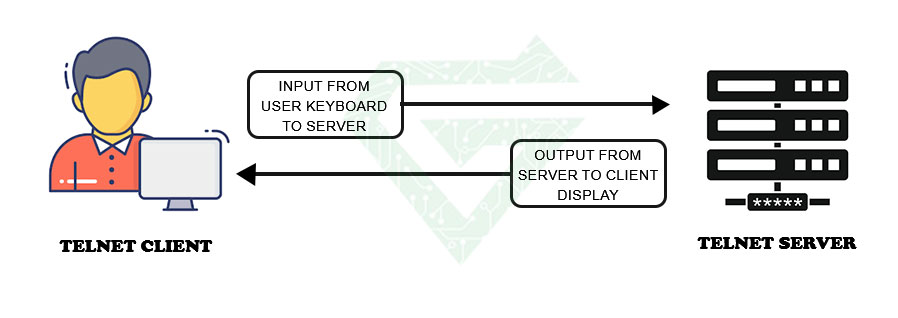
The telnet server listens to requests that come from client which begin the connection. When the connection is stablished, client can send the command to server and server transmits your keystrokes and receives the server’s responses, essentially creating a text-based communication channel. This connection is unencrypted that make this protocol not secure. We explain different steps of this protocol by details.
- Starting a session: for starting the telnet session, you must have a telnet client installed on your computer. You can find telnet client for most of operation system such as MAC, Linux and windows. After installing s client, you can open it and type command to connect the remote computer.
- controlling to the remote computer: when you enter the command for connecting the remote computer to establish a connection, the telnet client sends a request to remote computer to establish a connection. You will be prompted to enter a username and password to log in.
- controlling the remote computer: when you are log in, you can control the remote computer remotely as a person was sitting in front of it. You can run command, open files and do something else. You would normally do on the computer. The difference is you are doing it remotely, so maybe response time has a little delay.
- ending the session: when you have done your task, you can type “Exit” or “Quit” in command and ending the session. By this, you will disconnect from remote computer and return to your own computer.
Advantages of Telnet protocol:
- This protocol is lightweight and straightforward
- Save time
- It is very useful for simple text-based communication remotely
- Provide remote access to other one’s computer system
- Doesn’t need heavy resource
- This protocol allows the user for more access with fewer problems in data transmission
- Compatible with oldest systems and connected them to newer ones
- It is easy to implement and use for various systems
Disadvantages of telnet protocol:
- Maybe understanding of this protocol is difficult for beginners because this protocol is a little complex
- Data is plain text that sent into this protocol, because of that, it is not secure.
- Some of devices are disable because of not proper interlinking of remote and local devices.
Read more: What is SSH Protocol?
Does Telnet support multiple users?
Yes, this protocol can support multiple users and allowing them to connect the same remote system. Every user gets a separate telnet session and enabling independent interactions with remote CLI.
Purpose of Telnet:
Telnet protocol provides users with a bidirectional interactive text-oriented communication system utilizing a virtual terminal connection over 8 bytes. User data is interspersed in-band with telnet control information over the transmission control protocol (TCP). Often, Telnet was used on a terminal to execute functions remotely.
The user connects to the server by using the Telnet protocol, which means entering Telnet into a command prompt by following this syntax: telnet hostname port. The user then executes commands on the server by using specific Telnet commands into the Telnet prompt. To end a session and log off, the user ends a Telnet command with Telnet.
Uses of Telnet Protocol:
telnet protocol can do some activities on a server that say the in continue.
- Edit files
- Network diagnostics
- Automation and scripting
- Run various programs
- Check email
- Play game
- Remote administration and management
- Look up climate
Some of servers use telnet to enable remote connections to access public data and so9me routine activities that say them. This protocol is compatible with older systems that need access to specific data. And make the situation for users are able to connect to any software that uses text-based, unencrypted protocols from web server to ports.
Totally we can say;
- Network device management: telnet protocol is used for remotely managing network nodes such as switches, routers and servers. It lets administrators to configure the setting and update firmware without being physically present in location of devices.
- Testing services: another uses of this protocol is testing services. Network administrator can use this protocol to test responsiveness of servers and verify if specific ports are open.
- Email debugging: this protocol can use to debug email problems with connecting directly to email server, one can manually send commands and receive responses, helping to identify any issues.
Read more: DDoS Attack and all about it
How can login in Telnet?
The logging can be in two categories: local login and remote login.
- Local login: when a user logs into a local system, this connection is known as local login. This connection has some steps such as: when a user type in terminal driver, the terminal driver accepted the keystrokes, then passes the characters to OS. Finally, OS validates the combinations of characters and opens the required application.
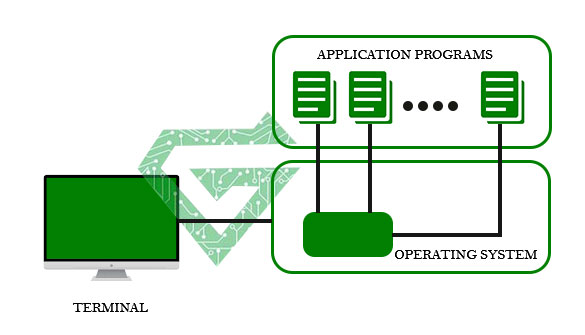
- Remote login: in this way, users log in into a remote site. For example, services and computers that are available on remote computer. With helping of remote login, a user can know the result of sending the result of processing from remote computer to the local.
Steps of remote login:
- once the user types something on the local computer, the local operating system accepts the character.
- The local computer does not interpret the characters, it will send them to the TELNET client.
- TELNET client transforms these characters to a universal character set called Network Virtual Terminal (NVT) characters and it will pass them to the local TCP/IP protocol Stack.
- Commands or text which are in the form of NVT, travel through the Internet and it will arrive at the TCP/IP stack at the remote computer.
- Characters are then delivered to the operating system and later on passed to the TELNET server.
- Then TELNET server changes those characters to characters that can be understandable by a remote computer.
- The remote operating system receives characters from a pseudo-terminal driver, which is a piece of software that pretends that characters are coming from a terminal.
- The operating system then passes the character to the appropriate application program.
Some commands in telnet protocol:
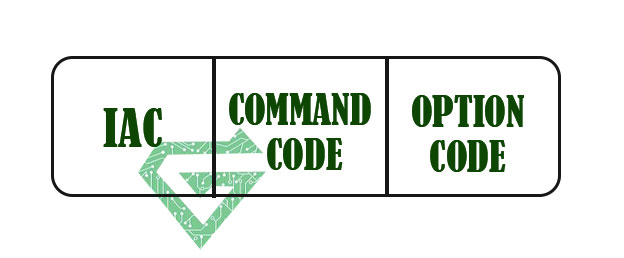
Telnet commands identify by prefix character “IAC” with code 255. The main format of the command is shown following figure.
| Meaning | Character | Decimal | Binary |
|---|---|---|---|
| 1. Offering to enable. | WILL | 251 | 11111011 |
| 2. Accepting a request to enable. | |||
| 1. Rejecting a request to enable. | WON’T | 252 | 11111100 |
| 2. Offering to disable. | |||
| 3. Accepting a request to disable. | |||
| 1. Approving a request to enable. | DO | 253 | 11111101` |
| 2. Requesting to enable. | |||
| 1. Disapproving a request to enable. | DON’T | 254 | 11111110 |
| 2. Approving an offer to disable. | |||
| 3. Requesting to disable. |
| Meaning | Option | Code |
|---|---|---|
| It interprets as 8-bit binary transmission. | Binary | 0 |
| It will echo the data that is received on one side to the other side. | Echo | 1 |
| It will suppress go ahead signal after data. | Suppress go ahead | 3 |
| It will request the status of TELNET. | Status | 5 |
| It defines the timing marks. | Timing mark | 6 |
| It specifies the line width. | Line width | 8 |
| It specifies the number of lines on a page. | Page size | 9 |
| It set the terminal type. | Terminal type | 24 |
| It set the terminal speed. | Terminal speed | 32 |
| It will change to the line mode. | Line mode | 34 |
Is Telnet secure?
Telnet protocol was developed before accepted the mainstream adoption of the internet. For this, it lacks modern encryption features and is not considered secure for transmitting sensitive information. Telnet monitors a user’s connection, anyone can access a person’s username, password and other private information typed over the Telnet session in plaintext.
A bad actor can use this information to gain access to a user’s device. most of network managers recommend SSH protocol to have more secure network. SSH encrypts all information that transmit between client and server.
Conclusion:
The Telnet protocol is a client-server that lets remote access to virtual terminal with local area network. this protocol has some advantages and disadvantages that we described them in this article.
One of the bad points of Telnet protocol is “not secure” but one of the best features of that is remote connection. This ability makes it useful protocol for remote administration, network diagnostics and interacting with legacy systems.
Most of the experts say that SSH protocol is better than Telnet protocol. We will work on SSH in other post. If this article is useful for you, read other posts in Atech blog.