


Upgrading Your Server with the Best CPU RAM and GPU


Upgrading a server is one of the most effective ways to improve performance, increase efficiency, and extend the life of your existing hardware. Whether you’re running a business application, managing a database, or hosting virtual machines, the right components can make a significant difference.
Among the most critical upgrades are the CPU (processor), RAM (memory), and GPU Server (graphics card). Each plays a vital role in handling workloads, improving speed, and supporting modern applications, So Upgrading Your Server with the Best CPU RAM and GPU ca be necessary for all networks.
In this guide, we’ll explore why these components are so important, how to choose the best options for your needs, and what factors to consider before upgrading. By the end, you’ll know how to turn your existing server into a high-performance powerhouse without breaking the bank.
Server accessories:
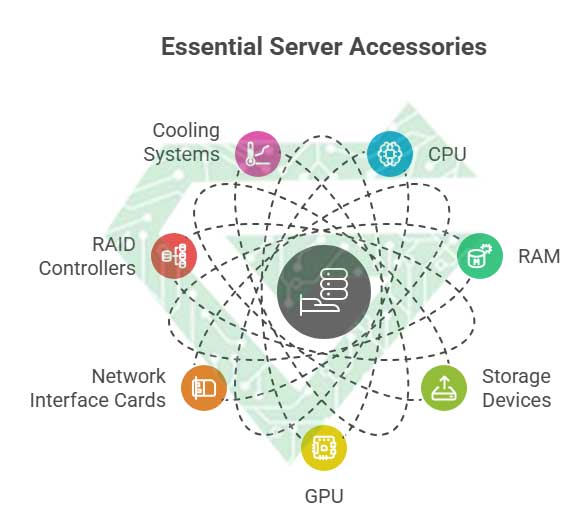
Server accessories, often referred to as server components or upgrade parts, are the essential hardware elements that determine a server’s performance, reliability, and scalability. These include the CPU (Central Processing Unit), which acts as the brain of the server and handles all processing tasks, and RAM (Random Access Memory), which temporarily stores data for quick access, enabling smooth multitasking and faster application performance.
Storage devices such as HDDs (Hard Disk Drives) and SSDs (Solid-State Drives) provide permanent data storage, with SSDs offering much faster speeds. For specialized workloads like AI, machine learning, or virtualization, a GPU (Graphics Processing Unit) can significantly accelerate computing tasks.
Additional components such as network interface cards (NICs), RAID controllers, and cooling systems help improve connectivity, data management, and thermal performance, making them critical for maintaining optimal server operation.
- CPU (Processor): Handles all processing tasks; determines overall speed and performance.
- RAM (Memory): Stores temporary data for quick access; crucial for multitasking and running applications smoothly.
- Storage Drives (HDD/SSD): Permanent storage for operating systems, applications, and data. SSDs provide faster performance than HDDs.
- GPU (Graphics Card): Accelerates processing for graphics, AI, machine learning, and heavy computational workloads.
- Network Interface Card (NIC): Enhances network connectivity and bandwidth.
- RAID Controller: Manages multiple drives for redundancy and performance optimization.
- Cooling System (Fans/Heatsinks): Maintains temperature stability to prevent overheating.
- Power Supply Units (PSU): Ensures consistent and reliable power delivery to all components.
Read more: SAS vs SATA, Which one is better?
How do server accessories work?
Server accessories work by dividing tasks among different components, each with a specific role to keep the server running efficiently. The CPU (Central Processing Unit) processes instructions and performs calculations for all applications and operating system tasks.
It works closely with RAM (Random Access Memory), which temporarily stores data the CPU needs to access quickly, reducing delays. For permanent data storage, the HDD (Hard Disk Drive) or SSD (Solid-State Drive) holds files, operating systems, and databases; SSDs provide much faster read/write speeds than HDDs.
In some servers, GPUs (Graphics Processing Units) assist the CPU Server by handling heavy parallel computations like AI workloads, rendering, or virtualization tasks. Supporting components such as network cards manage data transfer across networks, while RAID controllers optimize storage performance and redundancy. Finally, cooling systems and power supplies ensure stable operation by maintaining proper temperature and reliable power delivery.
- CPU (Processor): Executes instructions and handles all processing tasks.
- RAM (Memory): Temporarily stores active data for quick CPU access.
- Storage Drives (HDD/SSD): Store operating system, applications, and user data permanently.
- GPU (Graphics Card): Processes complex parallel tasks like graphics rendering, AI, and big data analysis.
- Network Interface Card (NIC): Manages data communication between the server and network.
- RAID Controller: Combines multiple drives for improved speed and data protection.
- Cooling System: Prevents overheating by removing excess heat.
- Power Supply Unit (PSU): Delivers consistent power to all components.
How do server components influence server functionality?
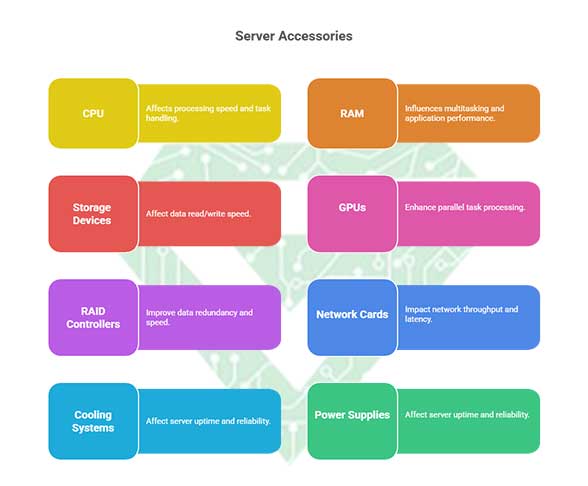
Server accessories play a critical role in the overall operation and efficiency of a server. The CPU affects the processing speed and determines how quickly the server can execute instructions and handle multiple tasks. RAM influences multitasking and application performance by providing fast temporary storage for active processes, so Upgrading Your Server with the Best CPU RAM and GPU is really important.
Without enough RAM, servers experience slowdowns and bottlenecks. Storage devices (HDD/SSD) affect how quickly data is read and written; SSDs can dramatically improve boot time, application load speed, and database operations compared to HDDs.
GPUs enhance the server’s ability to process large-scale parallel tasks like machine learning, video rendering, and virtualization. Additional accessories such as RAID controllers improve data redundancy and speed, while network interface cards impact network throughput and latency.
Even cooling systems and power supplies affect server uptime and reliability because overheating or unstable power can lead to crashes or hardware damage. In short, every accessory influences performance, scalability, and stability.
- CPU (Processor): Determines speed of data processing and multitasking capability.
- Ram (Memory): Affects multitasking efficiency and application performance; insufficient RAM leads to slowdowns.
- Storage (HDD/SSD): Influences data access speed, file transfer rates, and database performance.
- GPU (Graphics Card): Improves performance for AI, machine learning, and heavy computational tasks.
- Network Interface Card (NIC): Impacts network speed, latency, and connectivity reliability.
- RAID Controller: Enhances storage performance and adds redundancy for data protection.
- Cooling System: Maintains optimal temperature, preventing overheating and downtime.
- Power Supply Unit (PSU): Provides stable power; failure affects server uptime and safety.
Read more: What is HP server
Why should you upgrade your server and its components?
Upgrading Your Server with the Best CPU RAM and GPU is crucial to ensure optimal performance, reliability, and efficiency. As workloads increase and software becomes more demanding, older hardware may struggle to keep up, leading to slow response times, downtime, or bottlenecks.
Upgrading key components such as the CPU, RAM, storage drives, and GPU can significantly improve processing speed, multitasking capability, and data handling. Additionally, modern components often consume less power, run cooler, and support the latest technologies, making your server more energy-efficient and future-proof.
Regular upgrades also enhance security, as newer hardware supports updated firmware and encryption standards. Ultimately, keeping your server’s hardware up to date helps maintain high performance, reliability, and scalability, ensuring that your business or applications run smoothly.
- Improved Performance: Faster CPUs, more RAM, and SSDs reduce delays and increase processing speed.
- Better Multitasking: More memory and stronger processors allow the server to handle multiple tasks or users simultaneously.
- Increased Reliability: Newer hardware reduces the risk of crashes or failures.
- Enhanced Storage Speed & Capacity: SSDs and upgraded drives improve read/write speeds and storage capacity.
- Energy Efficiency: Modern components often consume less power and produce less heat.
- Support for Latest Technologies: New CPUs, GPUs, and RAM support modern software, virtualization, and AI workloads.
- Improved Security: New hardware often supports updated firmware and encryption protocols.
- Future-Proofing: Upgrades ensure your server can handle growing workloads and evolving business needs.
Upgrading Your Server with the Best CPU RAM and GPU:
- Upgrading the CPU (Processor)
The CPU is the brain of the server, responsible for processing instructions and running applications. Upgrading to a faster or more advanced processor can:
- Increase processing speed for applications and databases.
- Improve multitasking by handling more simultaneous threads.
- Enhance performance for virtual machines and containerized environments.
Tips for CPU upgrades:
- Match the CPU with your server motherboard’s socket type.
- Consider power consumption and heat generation.
- Choose CPUs that support virtualization if needed.
Read more: What is a server power supply
- Upgrading RAM (Memory)
RAM temporarily stores data that the CPU needs to access quickly. More or faster RAM allows a server to run multiple applications smoothly and handle larger datasets. Benefits include:
- Reduced application lag and faster response times.
- Improved performance for virtualization and database management.
- Ability to handle more simultaneous users or processes.
Tips for RAM upgrades:
- Check your server’s maximum RAM capacity.
- Use ECC (Error-Correcting Code) RAM for higher reliability.
- Match memory speed with the server motherboard for optimal performance.
- Upgrading GPU (Graphics Card)
While not essential for all servers, GPUs are critical for tasks requiring high parallel processing power, such as AI, machine learning, 3D rendering, and video processing. Upgrading or adding a GPU can:
- Significantly accelerate computation-heavy workloads.
- Offload processing from the CPU, improving overall system performance.
- Support advanced AI, deep learning, or virtualization tasks.
Tips for GPU upgrades:
- Ensure compatibility with the server chassis and power supply.
- Consider GPUs designed for data center or server use (like NVIDIA GPU).
- Check cooling requirements to prevent overheating.
- Why Upgrading These Components Matters
- Improved performance: Faster processing, more memory, and GPU acceleration enhance overall server speed.
- Scalability: Upgraded components allow the server to handle increased workloads and future growth.
- Reliability: Modern CPUs, RAM, and GPUs are more efficient, stable, and less prone to failure.
- Cost-effectiveness: Upgrading key components can be cheaper than buying a completely new server.
Conclusion:
Upgrading your server with the best CPUs, RAM, and GPUs is essential for businesses that need high performance, reliability, and future-proof infrastructure. By carefully selecting compatible and high-quality components, you can transform your existing server into a powerful machine capable of handling demanding applications, improving efficiency, and supporting growth.
Upgrade your business infrastructure today with high-quality servers and accessories from Atech.ae. Whether you need powerful CPUs, fast Ram server, large SSDs, or advanced GPUs, we have everything to make your server run at peak performance.
At Atech.ae, we stand behind every server such as HPE server and server accessories we sell. All our products come with a reliable warranty and guarantee, ensuring peace of mind for your business.
- Full Warranty: Protects your purchase against manufacturing defects.
- Satisfaction Guarantee: If the product doesn’t meet your expectations, we’ll make it right.
- Support You Can Count On: Our expert team is ready to assist with setup, upgrades, or any issues.
Invest in Atech.ae products with confidence guaranteed performance, reliability, and support.