


What is HP Server Hard Drive

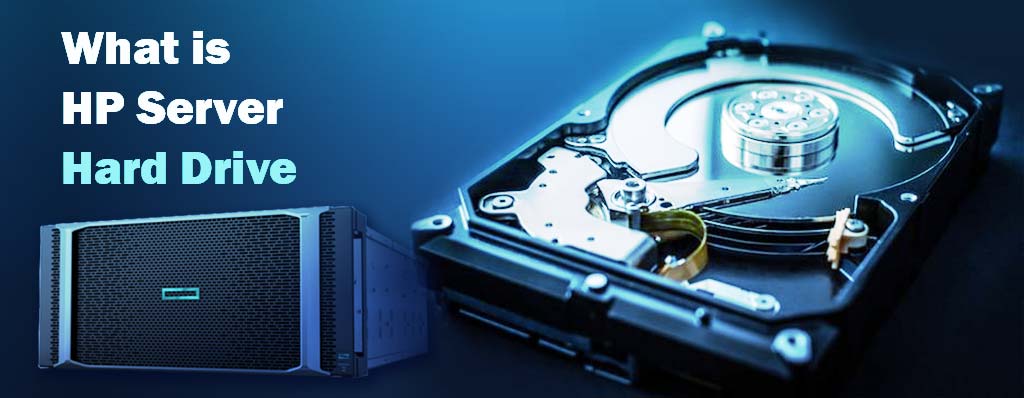
Your server is on all day, every day. It means the hardware needs to be so reliable. The main and key components are processor, RAM, power supply and hard drive. Servers are available in both freestanding and rackmount forms. so it is very necessary that you buy a powerful and full quality hard server and other network equipment such as server, Network Router, Network switch and etc.
Because all of them match together and they can effect on each other. We will explain every thing about Server hardware especially HP Server Hard Drive. If this article is useful for you, you can read others in atech.ae blog.
What is HP Server Hard Drive:
HP Server Hard drive is a standard hard drive with high-performance. HPE Hard Server includes variety types and every of them has specially properties. HP Hard Drive or HDD is designed for meeting demanding needs of enterprise and small business environments. It offers reliability security and making the best idea for a wide range of workloads, including virtualization, cloud computing, big data analytics and mission-critical application.
HP Server Hard Drives are optimized for performance and reliability, offering features such as faster data transfer rates, larger cache sizes, and advanced error correction capabilities. Server hard drive can be either mechanical hard drives (HDDs) or solid-state drives (SSDs), depending on the specific requirements and budget of the server system.
Only healthy server hard drive drives are approved for resale to our customers. All of Flagship Technologies refurbished HP/HPE hard drives are cleaned, fully tested and vetted for surface defects and wear. Flagship Technologies refurbished server hard drives are formatted and wiped of any previous data via the latest DOD standards. We do NOT disassemble, modify or replace individual components of hard drives as part of our refurbishing process.
Variety types of HP Server Hard Drive:
HDDs are available in a variety of capacities, form factors, and performance levels to meet the specific needs of your business. Here is an overview of some of the most popular HP/HPE HDDs:
- HP Enterprise HDDs: HP Enterprise HDDs are designed for the most demanding workloads, such as virtualization, cloud computing, and big data analytics. They offer high performance, reliability, and security. also HDDs are the traditional spinning disk drives that use magnetic storage to store data. They offer large storage capacities at a relatively lower cost. However, they have slower read and write speeds compared to other options.
- HP Standard HDDs: HP Standard HDDs are a good value for everyday workloads, such as file and print serving, web hosting, and email. They offer good performance and reliability at a lower price than HP Enterprise HDDs.
- HP Small Form Factor (SFF) HDDs: HP SFF HDDs are designed for space-constrained environments, such as blade servers and datacenter racks. They offer the same performance and reliability as HP Enterprise and Standard HDDs, but in a smaller form factor.
- Solid State Drives (SSD): SSDs use flash memory to store data, providing significantly faster read and write speeds compared to HDDs. They are more expensive per gigabyte but offer improved performance and reliability. SSDs are commonly used for applications that require high-speed data access, such as databases and virtualization.
- Non-Volatile Memory Express (NVMe) SSDs: NVMe SSDs are the latest advancement in storage technology. They use the NVMe protocol to communicate with the server, providing even faster data transfer speeds compared to traditional SSDs. NVMe SSDs are ideal for high-performance applications that require low latency and high throughput, such as big data analytics and artificial intelligence.
In addition to the type of hard drive, server storage options also include RAID (Redundant Array of Independent Disks) configurations, which provide data redundancy and improved performance. RAID can be implemented using various levels, such as RAID 0, RAID 1, RAID 5, and RAID 10, each offering different trade-offs between performance, capacity, and data protection.
It’s important to consider the specific requirements of the server workload when choosing the type of hard drive and storage options. Factors such as performance needs, capacity requirements, budget constraints, and data protection should be taken into account to ensure optimal storage solutions for server environments.
Read More: what is HP Server
What are server hard drives components and specification:
Server hardware components and specifications refer to the physical components and technical specifications that make up a server system. These components include the server’s processor, memory, storage, network interfaces, and other peripherals. The specifications determine the server’s performance, scalability, and reliability.
The server’s processor, or CPU (Central Processing Unit) such as intel CPU, is one of the most critical components. It determines the server’s processing power and speed. In recent years, there has been a shift towards multi-core processors, which allow for higher performance and better multitasking capabilities.
Memory, or Ram server, is another crucial component. It determines the server’s ability to handle multiple tasks simultaneously and affects the overall system performance. The latest trends in server memory include the adoption of higher capacity modules and faster memory speeds.
Storage is an essential component in servers, and there are various options available, including hard disk drives (HDDs), solid-state drives (SSDs), and NVMe (Non-Volatile Memory Express) drives. SSDs and NVMe drives offer significantly faster data access and transfer speeds compared to traditional HDDs.
Network interfaces, such as Ethernet ports, are necessary for connecting the server to a network. The latest advancements in networking technology include higher network speeds, such as 10 Gigabit Ethernet and 40 Gigabit Ethernet, to meet the increasing demands of data-intensive applications and cloud computing.
Other server hardware components include power supplies, cooling systems, and management interfaces. Power supplies ensure reliable and uninterrupted power delivery to the server, while cooling systems prevent overheating and maintain optimal operating temperatures.
In recent years, there has been a growing focus on energy efficiency and sustainability in server hardware design. Manufacturers are developing more power-efficient components and implementing technologies like virtualization and consolidation to maximize server utilization and reduce energy consumption.
Overall, server hardware components and specifications continue to evolve to meet the increasing demands of modern applications and workloads, such as big data analytics, artificial intelligence, and cloud computing. The latest advancements aim to deliver higher performance, scalability, and energy efficiency while ensuring reliable and secure server operations.
What is server HDD:
Server HDD meaning is a critical component used for data storage and applications on a server. As a non-volatile data storage device, a server HDD retains data even during device shutdowns.
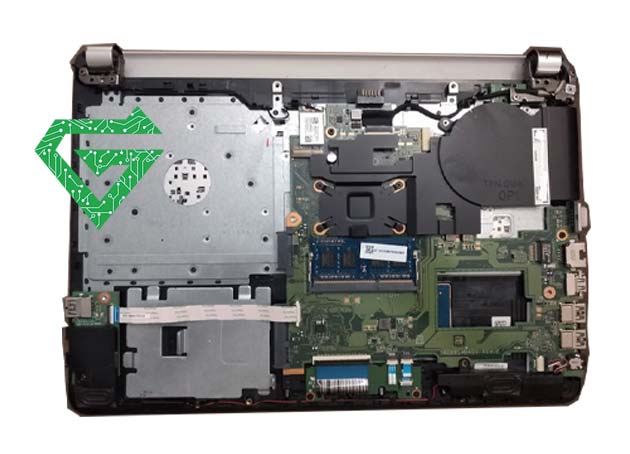
A server HDD is a mechanical hard disk comprising components such as the spindle, disk platter, actuator, actuator arm, and read/write head. Typically, data transmission in server HDDs occurs through spinning disks, where the read/write head accesses data on the disk platter and communicates it to the server.
However, it’s important to note that server HDDs are intricate and susceptible to damage. Physical shocks, such as bumps or drops, can impact the effectiveness of the arm, emphasizing the need for careful handling and protection of these components.
What is Server SSD:
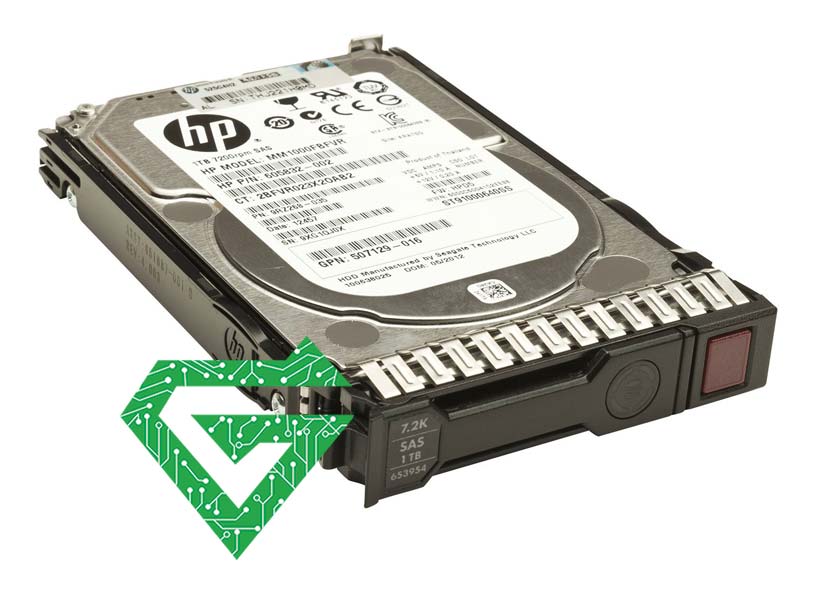
Unlike server HDDs, server SSDs (solid-state drives) store data in flash memory rather than using a magnetic-based system. Comprising multiple flash memory particles and main control chips, server SSDs lack mechanical parts, reducing susceptibility to damage during high-speed movements and minimizing data loss in cases of shock, vibration, or drops.
Server SSDs leverage integrated circuits (ICs) for data transfer, eliminating the need for moving parts and spinning disks. This design choice enhances read and write performance, making server SSDs a preferred choice for applications demanding high-speed data access. Common server SSD interfaces include Serial Advanced Technology Attachment (SATA), Serial Attached SCSI (SAS), and Non-Volatile Memory Express (NVMe).
Read more: What is Server CPU
Server HDD vs SSD:
- Performance: One of the most notable distinctions between server HDD and SSD lies in the faster read/write speed and lower latency of server SSDs. Why is SSD better than HDD? Due to the mechanical parts and fragmented data in server HDDs, they exhibit a slower boot time compared to server SSDs.
- Storage capacity: Capacity is a crucial factor for hosting companies, particularly for growing businesses. Server SSDs not only offer superior performance but also boast larger storage capacities. While server HDDs typically range from 1-8TB, with a maximum of 20TB or more, server SSDs can achieve capacities of 50-100TB.
- Power consumption: Server SSDs require less power compared to server HDDs, thanks to their lack of moving parts. Generally, a server HDD consumes up to 10W, while a server SSD uses approximately 5W. The reduced power consumption of server SSDs also diminishes the need for a robust cooling system, enhancing energy efficiency.
- Durability: Server SSDs generally have a longer lifespan than server HDDs, with an estimated lifespan of around 10 years compared to 3 to 5 years for HDDs. The absence of moving parts makes SSDs less susceptible to external damage such as shock and falls, contributing to enhanced data integrity.
- Price: The primary drawback of server SSDs is their higher cost compared to server HDDs. As a relatively new storage technology, server SSDs are comparatively expensive, while the HDD machine price is relatively economical. Typically, SSDs cost around $0.07 per GB, while HDDs are priced at approximately $0.03 per GB. Although the price gap is narrowing, server SSDs remain less cost-effective than server HDDs.
Which One Is Better?
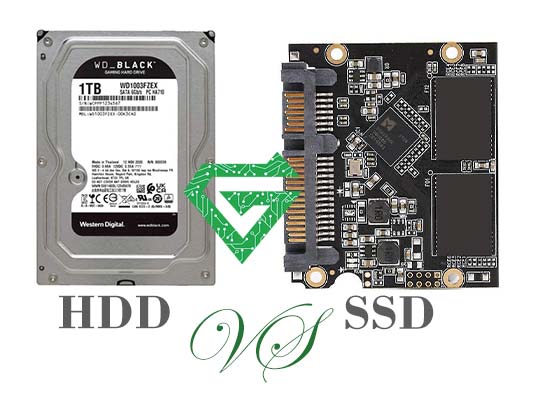
In the realm of hosting, two primary storage devices are employed by companies to store data: hard disk drives (HDDs) and solid-state drives (SSDs). In recent years, there has been a notable shift from HDDs to SSDs, a trend also observed in servers. The performance of servers is significantly influenced by the choice of hard drive. This article aims to delineate the disparities between server HDDs and server SSDs, delving into whether server SSDs indeed outperform their HDD counterparts.
while server SSDs may not be as cost-effective as server HDDs, they outshine HDDs in various aspects, offering superior performance, larger storage capacity, reduced power consumption, and an extended lifespan. Hosting companies can make informed choices based on their specific requirements. However, considering the long-term economic benefits, SSDs are likely to provide greater value.
| Features | Server HDD | Server SSD |
|---|---|---|
| Operating Principle | Mechanical rotating components and magnetic technology | Flash storage technology |
| Read/Write Speed | Relatively slow | Faster |
| Random Access Speed | Slower, affected by seek and rotational latency | Faster, no seek and rotational latency |
| Access Time | Longer, influenced by mechanical components | Shorter |
| Reliability | Mechanical components are susceptible to shocks and vibrations | No mechanical components, more durable |
| Durability | Mechanical components are prone to damage | Shock and vibration resistant |
| Power Consumption | Higher, mechanical components require more energy | Lower, energy-efficient |
| Heat Generation | Higher, mechanical components in operation generate heat | Lower, does not generate much heat |
| Noise | Mechanical motion produces noise | No noise |
| Storage Capacity | Larger capacity | Smaller capacity |
| Price | Generally cheaper | Generally more expensive |
| Applicable Scenarios | Large-capacity storage, cost-sensitive projects | High-performance, speed, and reliability requirements |
| Possibility of Long-Term Idleness | May cause data loss or degradation | Longer data retention time |
| Data Persistence | Time is needed to write data to the disk, more prone to loss | Fast data writing speed, more reliable in case of power outage |
| (Power Outage Scenario) | ||
| Technological Development Trends | Gradually being phased out but still used for large-capacity storage | Continuously evolving and improving, gradually becoming popular |
Features of HP Server Hard Drive:
- High reliability: Server hard drive is usually subject to a huge workload because the server has to run for 24 hours. Various hard drive manufacturers have adopted their unique and innovative technology to ensure complete data security. According to Dell server hard drive experts, in order to avoid accidental loss, server hard drives are designed to withstand an impact force.
- High speed: The HPE server hard drive used by the server can reach speeds of around 5,400 rpm (SATA Drives) to 15,000 rpm (SAS Drives) revolutions per minute. This drive also has a large write cache as it handles multiple read and write requests very quickly. Therefore, the average time to access the system is comparatively short. The internal and external transfer rates are also higher in comparison.
- Long Lasting: The server hard drives are durable and store large chunk of historical data depending on the size of the server drive. As the server drives have to work continuously 24×7×365 they are built for maximum reliability, minimum failures and handling requests with minimum latency.
Read more: What is HP Server Memory
How do we reinitialize the HP Secure Hard drive:
The HP embedded Web server option Reinitialize Hard Drive unlocks the HP Secure Hard Disk from the printer/MFP and resets encryption making the data inaccessible. You might need to reinitialize if an installed HP Secure Hard Disk was encrypted or originally locked to a different printer/MFP.
A reinitialized HP Secure Hard Disk can be re-locked to the same printer/MFP, or moved to a different (compatible) printer/MFP. (Verify that the printer/MFP uses the latest firmware version.)
Pay attention: all of exciting information and data on your HP Server Secure Hard Disk inaccessible and disk encryption is reset. Finally the printer is restarts at the end of process. The setting that enables encryption when the printer/MFP starts (Automatically enable encryption when powered on) is disabled. You must manually select to enable encryption.
-Start a supported Web browser and enter the IP address or host name of the printer/MFP as the URL.
-From the HP embedded Web server page, select the Settings tab, and then select Security.
-In the Hard Drive and Mass Storage Security Settings section, select Configure. The HP Secure Hard Disk status is displayed, which includes the type, serial number, drive status, and encryption status, as in the following:
example:
Hard Disk: Internal (encryptable)
Serial Number: ABCDE1234567890abcde
Drive Status: Enabled
Encryption Status: Encrypted
-Select Reinitialize Hard Drive.
-When the process is complete and the printer has restarted, go to the Hard Drive and Mass Storage Security Settings page (HP encrypted Hard Drive Configuration), and select Enable Encryption using Random Drive Password, which is recommended, or Manually Specify Drive Password.
-If you select to manually specify the drive password, enter the password to use. (The password is displayed for auditing purposes.)
-To activate your selection, click the Enable Encryption option.
Disable encryption:
The HP embedded Web server option Disable encryption and continue, disables encryption on the printer/MFP. Use this option when a printer/MFP is configured to use an HP Secure Hard Disk, but a standard (non-encrypted) hard disk is installed in its place. Using this option assumes that you want to disable encryption and continue using the standard (non-encrypted) hard disk. Otherwise, you must locate and install the correct HP Secure Hard Disk that is locked to this printer/MFP.
When you disable encryption, the information on the previously encrypted HP Secure Hard Disk is unreadable, since the encryption key no longer matches the key stored on the printer/MFP. Selecting this option reboots the printer/MFP.
Notice: All information on the original HP Secure Hard Disk becomes unreadable. The printer/MFP restarts at the end of the process. The setting to enable encryption when the printer/MFP starts (Automatically enable encryption when powered on) is disabled.
- Start a supported Web browser and enter the IP address or host name of the printer/MFP as the URL.
- From the HP embedded Web server page, select the Settings tab, and then select Security.
- In the Hard Drive and Mass Storage Security Settings section, select Configure. The HP Secure Hard Disk status is displayed, which includes the type, serial number, drive status, and encryption status.
- To reset encryption, select Disable encryption and continue.
Notice: Disabling encryption occurs almost immediately. However, three time need to reboot the printer/MFP depends on the model.
How to secure storage erase:
Choose this option to permanently remove all data from the encrypted HP Secure Hard Disk or the standard (non-encrypted) hard disk(s). After the data is erased, the printer/MFP reboots. Erasing the disk can take significant time (hours) to complete. (Unlike disabling encryption, which occurs almost immediately, this option overwrites data.)
- Start a supported Web browser and enter the IP address or host name of the printer/MFP as the URL.
- From the HP embedded Web server page, select the Settings tab, and then select Security.
- In the Hard Drive and Mass Storage Security Settings section, select Configure. The hard disk status is displayed, which includes the type, serial number, drive status, and encryption status.
- Select the device to erase.
- Click perform Secure Storage erase.
Conclusion:
HP Hard servers are designed for high performance and reliability, making them a crucial component of any server setup. Along with other essential server accessories such as RAM, CPU Server, and Motherboard Server, they ensure your server runs smoothly and efficiently. For top-quality HP server products and accessories, visit atech.ae and get the best solutions for your network infrastructure